
When you generate a Certificate Signing Request (CSR) from cpanel, then close it, which is a good thing, maybe you don€™t want to store it on your server. Instead, remove it because you can keep a CSR code on your PC so there is no need of storing it on the server.
1. Log into your cpanel account.
2. In the "Security" section,. "SSL/TLS" Icon.
3. Under Certificate Signing Request, Click on €œGenerate, View or Delete CSR€ Link.
. Under €œCertificate Signing Requests on Server€ text, you can see your previously generated CSR. You can see delete the option under €œAction€.
5.. €œDelete€ option which is located under the €œAction€ option and you will need to click on €œDelete€ again for the confirmation message.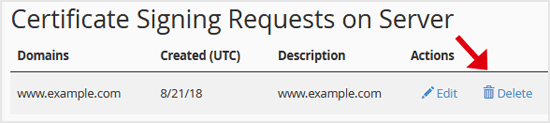
The CSR code will be removed and no longer stored on your server.
Get Fast & Affordable Hosting in India
Start your website with SSD hosting, free SSL, cPanel, daily backups and 24/7 support from HostCupid.
Also explore: WordPress Hosting | Reseller Hosting | Domain Registration