
2. In the "Domains" section, click on "Redirects" Icon.

3. Under "Add Redirect" you should enter the following details and chose the appropriate option.
Type: Permanent (301) or Temporary (302)
http://(www.)?: Leave this as it is or should you just want to redirect a folder or a page, then enter the name of your folder or a full page path in the text box.
Redirects to: Where you want to redirect your current domain or a page.
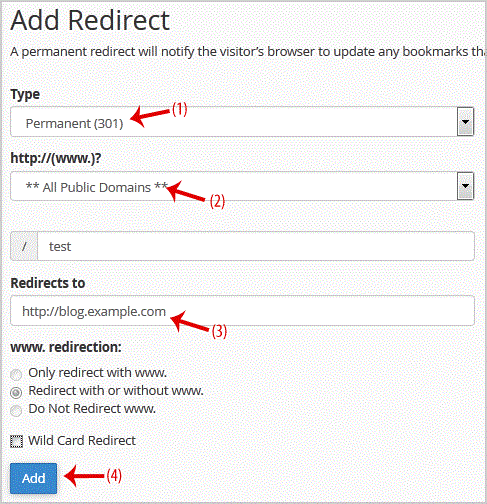
.. "Add" button.

Get Fast & Affordable Hosting in India
Start your website with SSD hosting, free SSL, cPanel, daily backups and 24/7 support from HostCupid.
Also explore: WordPress Hosting | Reseller Hosting | Domain Registration