
1. Log into your cpanel account.
2. In the "Domains" section, click on "Addon Domains" icon.

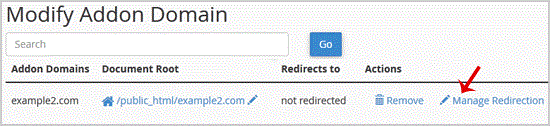
3. Under "Modify Addon Domain", locate the addon domain and click on "Manage Redirection".
. Enter the link to which .redirect the addon domain in the available text box
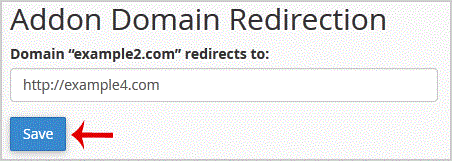
5. Click close.
Get Fast & Affordable Hosting in India
Start your website with SSD hosting, free SSL, cPanel, daily backups and 24/7 support from HostCupid.
Also explore: WordPress Hosting | Reseller Hosting | Domain Registration