
1. Login to your WordPress admin dashboard.
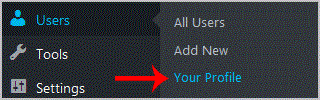
2. Under the dashboard ., hover your mouse over "Users" and then click on "Your Profile".
3. Scroll down and under Account Management you can see the "New Password" option.. "Generate Password" button.
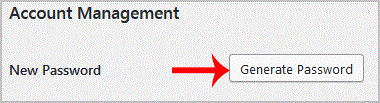
. Copy the password to a safe place and then click on "Update Profile" to change your password.
Get Fast & Affordable Hosting in India
Start your website with SSD hosting, free SSL, cPanel, daily backups and 24/7 support from HostCupid.
Also explore: WordPress Hosting | Reseller Hosting | Domain Registration