You can include or exclude your domain from AutoSSL.
If your domain is newly created, wait for few hours so cpanel can automatically install an SSL on your domain. However, if an SSL is not installed on your domain even after 24 hours, first check the last log of AutoSSL from cpanel >> SSL/TLS Status >> Certificate Status.
1. Log into your cpanel account.
2. In the "Security" section,. "SSL/TLS Status" icon.
3. Under domains, choose the domain .include and then. €œInclude x domains during AutoSSL€ babies and your selected domain/sub-domains will be included in AutoSSL.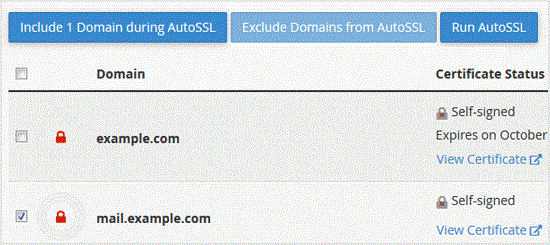
. Later, should .exclude your domain, which you included, under €œDomains€ text tick mark the domains .exclude and. €œExclude x domains during AutoSSL€ babies and your selected domain/subdomains will be excluded during AutoSSL.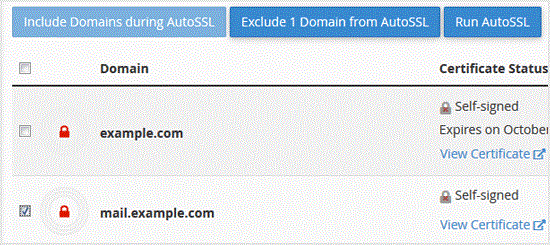
Note: Only domains included by you can be excluded. It means you can€™t exclude domains unless they are added in the inclusion option by you.
- 0 Users Found This Useful
-
How to Generate a Certificate Signing Request - CSR in cpanel?
For obtaining a certificate from a Trusted SSL Provider, the Certificate Signing Request(CSR) is...
How to retrieve an CSR from cpanel?If you generated your Certificate Signing Request (CSR) from cpanel and forgot your CSR then you...
How to Remove a CSR code from cpanel?When you generate a Certificate Signing Request (CSR) from cpanel, then close it, which is a good...
How to run AutoSSL on your Domains to install an SSL via cpanel?If your domain is created recently, wait for a few hours so that the cpanel can automatically...
