You can not remove "Uncategorized" Category but you can rename it
1. Login to your WordPress admin dashboard.
2. Under the dashboard ., hover your mouse on Posts and then click on "Categories".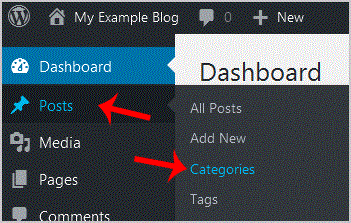
3. On the right side you can see the "Uncategorized" category option. Hover your mouse on it and a few options will appear.. "Quick Edit" option.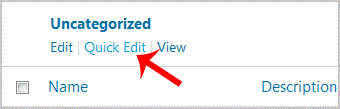
. Change the name and slug and then. "Update Category" option.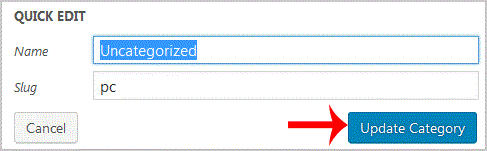
- 0 Users Found This Useful
-
How to remove multiple posts with a single click in WordPress?
It is possible to remove multiple post in your WordPress dashboard. You can also remove selected...
How to remove your post in Wordpress?You can remove your published or draft post in Wordpress.1. Login to your WordPress admin...
How to add a new category in WordPress?1. Login to your WordPress admin dashboard.2. Under the dashboard ., hover your mouse on Posts...
How to remove a category in WordPress?If you want to remove WordPress category then follow this instruction:1. Login to your WordPress...
How to start writing your first blog post in WordPress?1. Login to your WordPress admin dashboard.2. Under the dashboard ., hover your mouse on Posts...
