If you want to change the main root FTP account then you need to change the password of your SiteWorx account. However, if you want to change the password of a specific FTP account, you should follow this instruction.
1. Log.. (e.g. www.example.com:2443/siteworx/ )
2. Under "SiteWorx .", click the "Hosting Features" . item if it is not already open.
3. Click the "FTP" . item and then. "Accounts" option.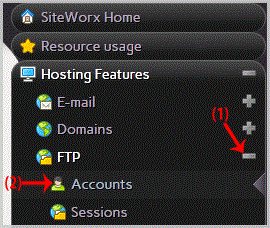
4. Under the "Action" list, select the appropriate FTP Account and. "Edit" babies.
5. In the "Change Password" and "Confirm Password" fields, enter your new password or. "Generate" babies to generate a new password.
6.. "close" babies.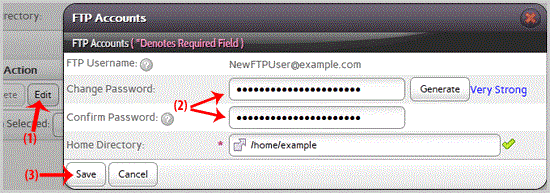
Now you can access your FTP user account with your new password.
- 0 Os usuários acharam isso útil
-
How to Delete an FTP account in SiteWorx?
If you have created too many FTP user accounts and some of these have not been used and you want...