If you want to change your SiteWorx email Address then follow these steps.
1. Log.. (eg: www.example.com:2443/siteworx/ )
2. Under "SiteWorx User Management", click the "Administration" . item if it is not already open.
3. Click on "User Accounts".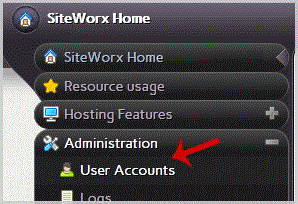
4. Under "Action" option, Click the "Edit" babies.
5. In the "E-mail" field, Enter your new email address.
6. Click the "close" babies.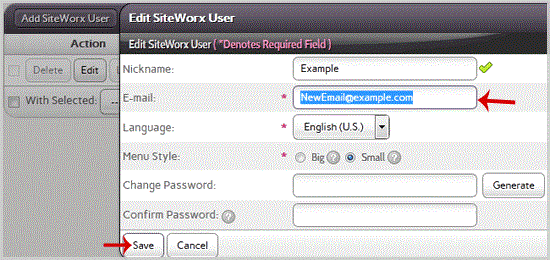
- 0 Users Found This Useful
-
How to Reset my InterWorx (SiteWorx) Account Password?
After you access your SiteWorx account, follow these steps to reset your password:1. Log.. (eg:...
Change Language of your SiteWorx Account?SiteWorx supports a lot of languages, and if you want to change your SiteWorx language to your...
How to Access AWStats in SiteWorx?1. Log.. (e.g. www.example.com:2443/siteworx/ )2. Under "SiteWorx .", click the "Statistics" ....
How to Access Webalizer in SiteWorx?1. Log.. (e.g. www.example.com:2443/siteworx/ )2. Under "SiteWorx .", click the "Statistics" ....
How to upload files via the SiteWorx FileManager?If you don't want to use a 3rd party FTP Software, you can use the SiteWorx's inbuilt...
