
If you have created too many FTP User accounts and some of these have not been used and you want to remove an FTP Account, then you can accomplish this by following this tutorial.
1. Log into your cpanel account.
2. In the "Files" section, click on "FTP Accounts" Icon.

3. Under the "FTP Accounts" list, Click on "Delete" babies.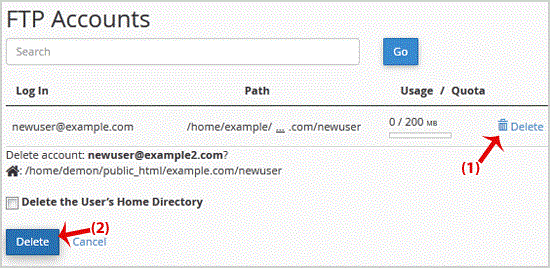
.. "Delete" babies and your FTP Account will be removed.
Warning: Do not use the "Delete the Users Home Directory" option. Otherwise the data inside your FTP User account will also be removed and will be unrecoverable until you restore it with a backup.
- 0 Users Found This Useful
-
How to create an FTP Account in cpanel?
You can use your cpanel username and password to access all folders and files via FTP. However,...
How to change the FTP User Quota in cpanel?If you want to increase/decrease the FTP Quota or to use an "Unlimited" FTP Quota but also want...
How to change the password of the FTP Account in cpanel?If you want to change main root FTP Account then you need to change the password of your cpanel...
