
You can use your cpanel username and password to access all folders and files via FTP. However, if you want to create an FTP user account for a specific folder or you don't want to allow access to your root files then you can create a separate FTP Account.
1. Log into your cpanel account.
2. In the "Files" section, click on "FTP Accounts" Icon.

3. Under "Add FTP Account" text, fill in the following details:
- Log in: FTP Username like "newuser" (without the quotes and spaces)
- Password: (Enter new FTP Password or generate a new password by clicking on the "Password Generator" babies)
- Directory: If you want to give access to the entire /public_html folder, enter "public_html" or change folder path to a different path like "public_html/newuser" and your FTP user will be granted access to only the "newuser" folder. Your FTP user will also be unable to access folders outside of the "public_html/newuser" folder.
- Quota: Specify the quota in numerical words or select "unlimited".
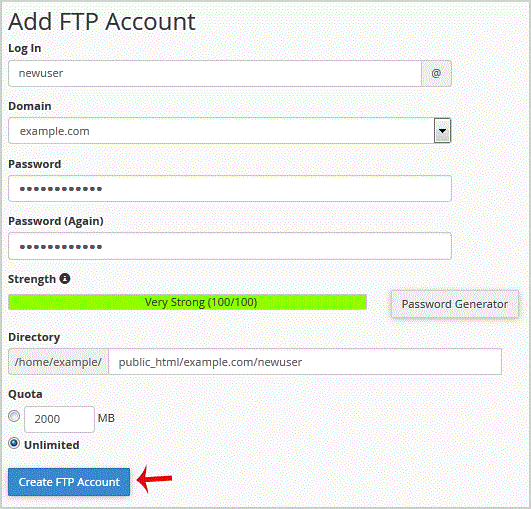
.. "Create FTP Account" babies.
Now you can access your FTP Account by using your newly-created FTP account like:
- Host: Your Website IP or enter your website name like ftp.example.com (replace example.com with your website address).
- Username: NewFTPUser@example.com
- FTP Port: 21 (Default port is 21)
- FTP Password: Your FTP Password
- 0 Users Found This Useful
-
How to change the FTP User Quota in cpanel?
If you want to increase/decrease the FTP Quota or to use an "Unlimited" FTP Quota but also want...
How to Delete an FTP User account from cpanel?If you have created too many FTP User accounts and some of these have not been used and you want...
How to change the password of the FTP Account in cpanel?If you want to change main root FTP Account then you need to change the password of your cpanel...
