If you don't want to use a 3rd party FTP Software, you can use the cpanel's inbuilt File Manager.
1. Log into your cpanel account.
2. In the "Files" section,. "File Manger" Icon.

3. cpanel File Manager will be open.
. Navigate to the directory where you want to upload your files to. For example, . your file to the public html folder, you need to go to /public_html first. On the left side you can see a list of directories. Double. "public_html" folder.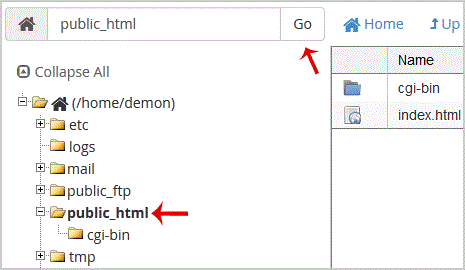
5. Now. "Upload" icon.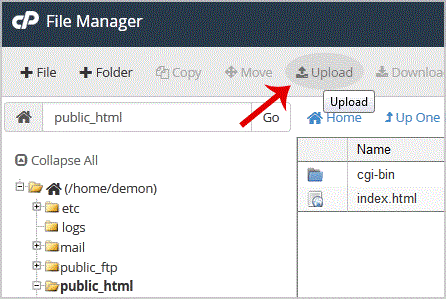
6.. "Select File" babies and select the file you want to upload from your PC. After you have select the file, the upload process will begin automatically.
- 0 Korisnici koji smatraju članak korisnim
-
How to update your cpanel Contact Information or receive a notification on reaching quota limit?
If you want to receive notification on reaching your disk quota, bandwidth usage limit, reaching...
How to Change cpanel Style/Theme?Switching over to another cpanel theme with a different style is easy and there are two ways to...
How to Edit file in the cpanel File Manager?1. Log into your cpanel account.2. In the "Files" section, click on "File Manger" Icon. 3....
How to Change Language of your cpanel?cpanel supports a lot of languages, and if you want to change your cpanel language to your native...
How to Reset my cpanel Account Password?If you can access your cpanel account, follow these steps to reset your password:1. Log into your...
