Switching over to another cpanel theme with a different style is easy and there are two ways to do so.
First method: Paper Lantern Theme.
1. Log into your cpanel account.
2. In the "Preferences" section,. "Change Style" Icon.

3. You will see a lot of themes on the themes page. Just select the one you like and click on "Apply". 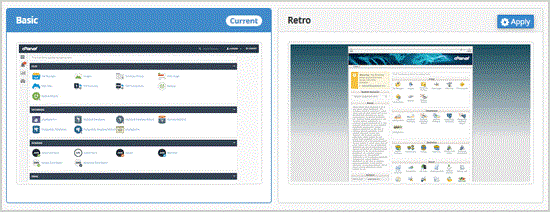
Second method: Change the theme instantly (Retro X3 Theme Only)
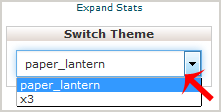
1. We assume you are already logged into your cpanel account. In your cpanel account near the left side of the page you should see a "Switch Theme" option with drop-down ..
2. Choose your favorite theme from the drop-down . and it will apply automatically.
- 0 Bu dökümanı faydalı bulan kullanıcılar:
-
How to update your cpanel Contact Information or receive a notification on reaching quota limit?
If you want to receive notification on reaching your disk quota, bandwidth usage limit, reaching...
How to Edit file in the cpanel File Manager?1. Log into your cpanel account.2. In the "Files" section, click on "File Manger" Icon. 3....
How to Change Language of your cpanel?cpanel supports a lot of languages, and if you want to change your cpanel language to your native...
How to Reset my cpanel Account Password?If you can access your cpanel account, follow these steps to reset your password:1. Log into your...
How to create a new folder or files in the cpanel File Manager?1. Log into your cpanel account.2. In the "Files" section,. "File Manger" Icon. 3. cpanel...
