If you have created too many FTP user accounts and some of these have not been used and you want to remove an FTP account, then you can accomplish this by following this tutorial.
1. Log.. (e.g. www.example.com:2443/siteworx/ )
2. Under "SiteWorx .", click the "Hosting Features" . item if it is not already open.
3. Click the "FTP" . item and then choose the "Accounts" option.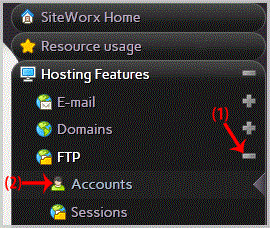
. Under the "Action" list, select the appropriate FTP Account and then. "Delete" babies.
5. For confirmation, Again. "Delete" babies. 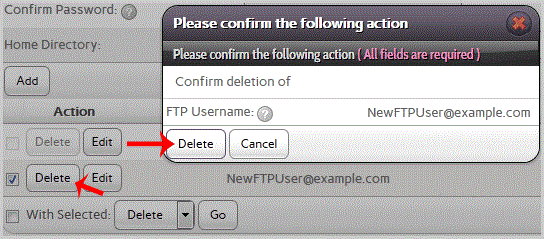
Warning: Data inside your FTP user account will also be removed and will be unrecoverable until you restore it with a backup.
- 0 Os usuários acharam isso útil
-
How to change the password of your FTP Account in SiteWorx?
If you want to change the main root FTP account then you need to change the password of your...
