When you generate a Certificate Signing Request (CSR) from cpanel, then close it, which is a good thing, maybe you don€™t want to store it on your server. Instead, remove it because you can keep a CSR code on your PC so there is no need of storing it on the server.
1. Log into your cpanel account.
2. In the "Security" section,. "SSL/TLS" Icon.
3. Under Certificate Signing Request, Click on €œGenerate, View or Delete CSR€ Link.
. Under €œCertificate Signing Requests on Server€ text, you can see your previously generated CSR. You can see delete the option under €œAction€.
5.. €œDelete€ option which is located under the €œAction€ option and you will need to click on €œDelete€ again for the confirmation message.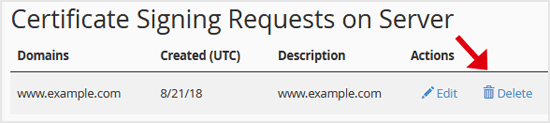
The CSR code will be removed and no longer stored on your server.
- 0 gebruikers vonden dit artikel nuttig
-
How to Generate a Certificate Signing Request - CSR in cpanel?
For obtaining a certificate from a Trusted SSL Provider, the Certificate Signing Request(CSR) is...
How to retrieve an CSR from cpanel?If you generated your Certificate Signing Request (CSR) from cpanel and forgot your CSR then you...
How to run AutoSSL on your Domains to install an SSL via cpanel?If your domain is created recently, wait for a few hours so that the cpanel can automatically...
How to Include or Exclude a Domain from AutoSSL in cpanel?You can include or exclude your domain from AutoSSL.If your domain is newly created, wait for...
