cpanel supports a lot of languages, and if you want to change your cpanel language to your native language, you should follow this tutorial.
1. Log into your cpanel account.
2. In the "Preferences" section, click on "Change Language" Icon. 
3. From the cpanel Language Configuration Page, chose your language from the . and then. "Change" babies.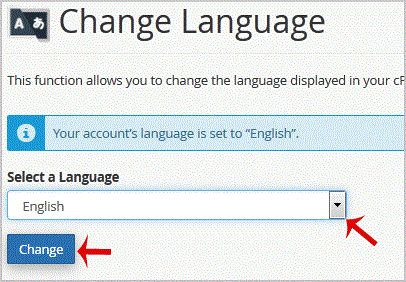
Your cpanel language has been successfully changed.
- 0 Kunder som kunne bruge dette svar
-
How to update your cpanel Contact Information or receive a notification on reaching quota limit?
If you want to receive notification on reaching your disk quota, bandwidth usage limit, reaching...
How to Change cpanel Style/Theme?Switching over to another cpanel theme with a different style is easy and there are two ways to...
How to Edit file in the cpanel File Manager?1. Log into your cpanel account.2. In the "Files" section, click on "File Manger" Icon. 3....
How to Reset my cpanel Account Password?If you can access your cpanel account, follow these steps to reset your password:1. Log into your...
How to create a new folder or files in the cpanel File Manager?1. Log into your cpanel account.2. In the "Files" section,. "File Manger" Icon. 3. cpanel...
