If your WordPress plugin is not working properly or you want to re-install it even when it is updated to its latest version, without losing data, you can do this without removing the plugin.
You can do this with both active or deactivated plugins.
1. Login to your WordPress admin dashboard.
2. Under the dashboard ., hover your mouse over "Plugins" and then click on "Installed Plugins".
3. Locate the plugin .forcefully update and then click on "Edit".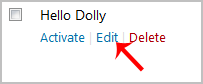
. In the editor, locate the text:
Version: 1.6
Then you will only need to change it to:
Version: 1.5
Only change the version from a higher to a lower number.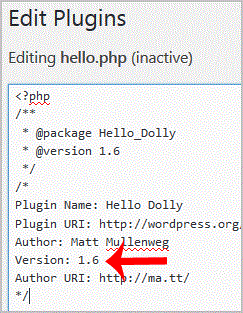
5. Scroll down and click on "Update File". Then go back to the "Installed Plugins" list and you will see a text like "There is a new version of"¦" and you will only need to click on "Update now". This will update your plugin"s files.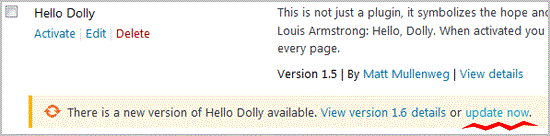
- 0 Uživatelům pomohlo
-
How to remove multiple posts with a single click in WordPress?
It is possible to remove multiple post in your WordPress dashboard. You can also remove selected...
How to remove your post in Wordpress?You can remove your published or draft post in Wordpress.1. Login to your WordPress admin...
How to add a new category in WordPress?1. Login to your WordPress admin dashboard.2. Under the dashboard ., hover your mouse on Posts...
How to remove the Uncategorized category from WordPress?You can not remove "Uncategorized" Category but you can rename it1. Login to your WordPress admin...
How to remove a category in WordPress?If you want to remove WordPress category then follow this instruction:1. Login to your WordPress...
