1. Log into your cpanel account.
2. In the "Domains" section,. "Addon Domains" icon.
3. Locate the addon domain under "Modify Addon Domain" and then. "Remove" link.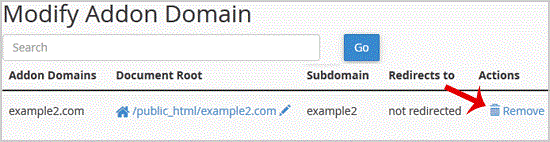
.. "Remove" babies once more.
You should see a success message notifying you that your Add-on domain has been completely removed.
- 0 用戶發現這個有用
-
How to Create a Subdomain in cpanel?
1. Log into your cpanel account.2. In the "Domains" section, click on "Subdomains" Icon. 3. Under...
How to Remove a Subdomain in cpanel?1. Log into your cpanel account.2. In the "Domains" section, click on "Subdomains" Icon. 3....
How to Park a Domain in cpanel?Note: Before parking a domain, First you need to update name server of your domain you want to...
How to Redirect an Add-on Domain?You can redirect your add-on domain to another domain.1. Log into your cpanel account.2. In the...
How to Redirect subdomain to an external url1. Log into your cpanel account.2. In the "Domains" section, click on "Subdomains" Icon. 3. Under...
