You can remove your published or draft post in Wordpress.
1. Login to your WordPress admin dashboard.
2. Under the dashboard ., hover your mouse on Posts and then click on "All Posts".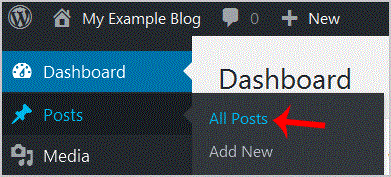
3. Choose the post .remove and the "Trash" option will appear, Click on it.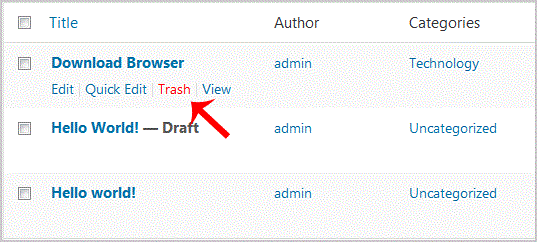
You will get a success message like "1 post moved to the Trash".
- 0 Els usuaris han Trobat Això Útil
-
How to remove multiple posts with a single click in WordPress?
It is possible to remove multiple post in your WordPress dashboard. You can also remove selected...
How to add a new category in WordPress?1. Login to your WordPress admin dashboard.2. Under the dashboard ., hover your mouse on Posts...
How to remove the Uncategorized category from WordPress?You can not remove "Uncategorized" Category but you can rename it1. Login to your WordPress admin...
How to remove a category in WordPress?If you want to remove WordPress category then follow this instruction:1. Login to your WordPress...
How to start writing your first blog post in WordPress?1. Login to your WordPress admin dashboard.2. Under the dashboard ., hover your mouse on Posts...
